



























How Does a VPN Actually Work? A Plain-English Guide
What a VPN actually hides on your internet traffic, what it doesn't, and what India's CERT-In logging rule means for VPN users.
Connect to hotel or airport Wi-Fi and, technically, anyone else on that same network can try to snoop on what you're sending — your bank's login page, a work email, whatever loads on your screen. A VPN is the tool built to stop that. But most explanations of it either drown you in networking jargon or oversell it as some kind of invisibility cloak. Neither is true, so here's what's actually happening under the hood.
What a VPN Actually Does
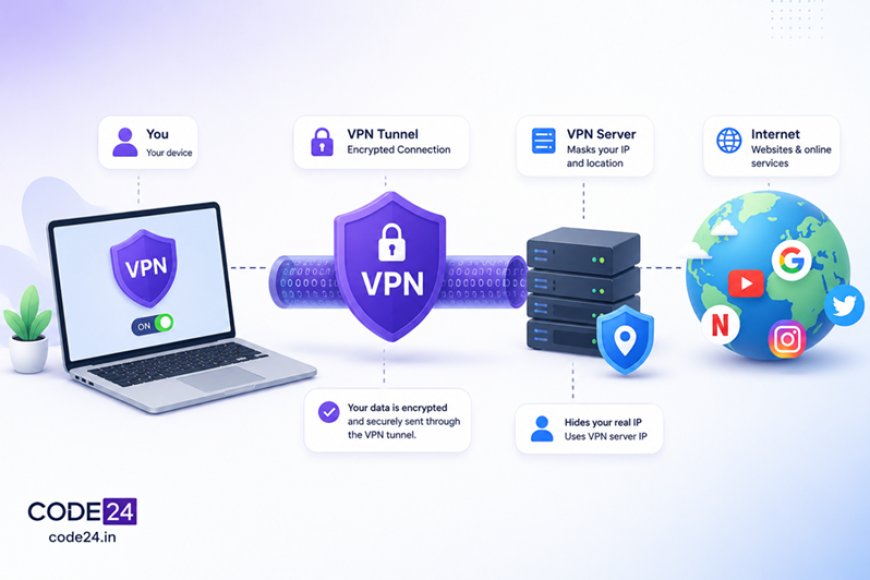
VPN stands for Virtual Private Network. Strip away the acronym and it's a fairly simple idea: instead of your device talking directly to websites over the open internet, it first connects to a VPN server run by a company like NordVPN, ExpressVPN, or a dozen others. That connection is wrapped in encryption — meaning your data is scrambled into unreadable gibberish for anyone in between — and only your device and the VPN server can unscramble it. Networking folks call this an encrypted "tunnel."
From the outside, two things change. First, your internet service provider (ISP) — the company that sells you your broadband or mobile data, like Jio or Airtel — can see that you're connected to a VPN server, but not what you're doing through it. Second, every website you visit sees the VPN server's IP address (the numeric label that identifies a device on the internet) instead of yours. That's why turning on a VPN can make a site think you're browsing from Singapore or the Netherlands even though you're sitting in Bengaluru.
What It Doesn't Do
This is where a lot of marketing overreaches. A VPN does not make you anonymous online. The VPN provider itself can usually still see your traffic — you're just moving your trust from your ISP to that company instead of eliminating it. If you log into your Google or Instagram account through a VPN, those services still know exactly who you are; the VPN only hides your network path, not your identity once you sign in. It also won't stop a phishing email from tricking you, and it won't secure a device that already has malware on it. Think of it as protecting the pipe your data travels through, not everything at either end of that pipe.
A VPN changes who can see your traffic. It doesn't change who you are once you log in.
The India Angle: Why Some VPNs Pulled Out of India
If you're browsing from India, there's a regulatory wrinkle worth knowing about. In 2022, India's Computer Emergency Response Team (CERT-In, the government body that handles cybersecurity incidents and issues security directives) introduced a rule requiring VPN companies operating in the country to log user data — names, email addresses, IP addresses, and reasons for use — and hand it over to authorities on request, keeping those records for five years even after a user cancels their subscription.
Several large VPN providers, including NordVPN, ExpressVPN, and Surfshark, responded by pulling their physical servers out of India entirely rather than comply. They still offer "virtual" Indian server locations — meaning a server physically elsewhere is configured to appear as an Indian IP address — but the actual logging obligation now mostly falls on VPN companies that keep real infrastructure inside the country. If privacy from the VPN provider itself matters to you, it's worth checking whether a service publishes an independently audited no-logs policy, and where its servers actually sit, rather than just trusting the marketing page.
When You Actually Need One
A VPN earns its place in specific situations rather than as a constant background habit for everyone. It's genuinely useful when:
- You regularly use public Wi-Fi — cafes, airports, co-working spaces — where anyone on the same network could intercept unencrypted traffic.
- You need to access a work network's internal tools remotely, which is how most companies actually use VPN technology day to day.
- You want to route around content that's geo-restricted for licensing reasons, keeping in mind this can violate a service's terms of use.
- You'd rather your ISP not be able to see which sites you visit, even if it can't see the content of what you send.
For everyday browsing over your home Wi-Fi or mobile data, most traffic is already encrypted by HTTPS (the padlock icon in your browser's address bar), which protects the content of what you send even without a VPN. A VPN adds a second layer on top of that, mainly hiding who you're talking to and where you're connecting from — not making already-encrypted content more encrypted.
Picking One, If You Do
If you decide you need one, the details matter more than the brand name on the ad. Look for a provider with a clear jurisdiction (which country's laws it answers to), a published audit of its no-logs claims, and app support for whatever devices you actually use — a VPN that only supports laptops isn't much help if most of your browsing happens on a phone. Free VPN apps are worth extra scrutiny: running server infrastructure costs money, and a free service has to fund that somehow, sometimes through practices as invasive as the tracking you were trying to avoid. Our rundown of privacy-friendly browsers covers a related piece of that puzzle if a VPN alone isn't giving you the full picture you want.
The honest takeaway: a VPN is one layer in a privacy setup, not a magic switch. Know what it actually hides, know what it doesn't, and pick one based on its policies rather than its promises.
What's Your Reaction?
 Like
0
Like
0
 Dislike
0
Dislike
0
 Love
0
Love
0
 Funny
0
Funny
0
 Angry
0
Angry
0
 Sad
0
Sad
0
 Wow
0
Wow
0