





































SSD vs HDD: What Indian Laptop Buyers Should Know
SSD vs HDD explained in plain English: how they differ, why it matters for speed and battery life, and what Indian buyers should pick.
Open a laptop listing on Flipkart or Amazon India and you'll see two storage terms sitting right next to each other on the spec sheet: SSD and HDD. They sound like minor variants of the same thing. They are not. One of them can genuinely make an eight-year-old laptop feel new again, and the other is often the quiet reason a "budget" laptop feels sluggish out of the box.
Two Very Different Ways to Store Your Files
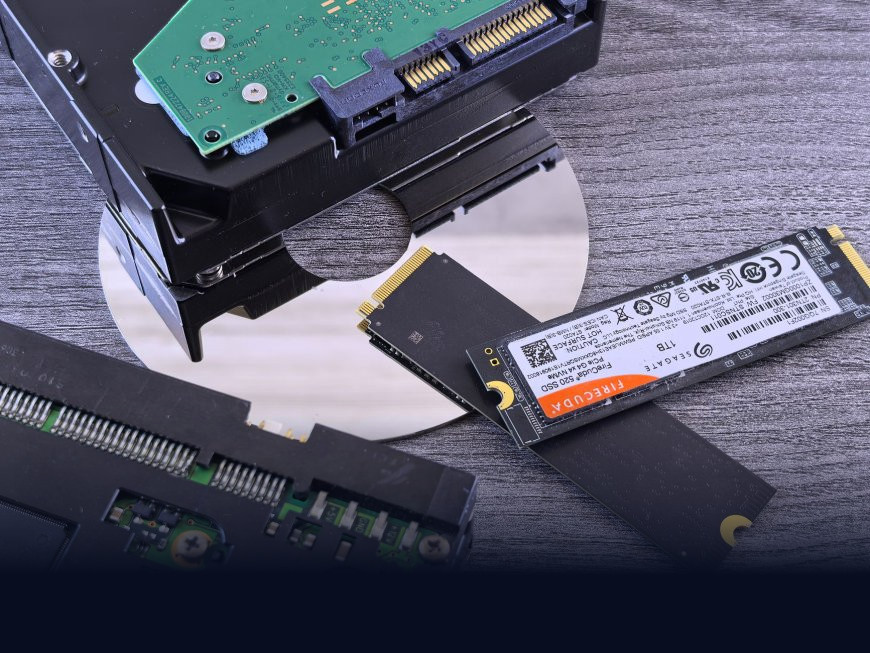
An HDD, or hard disk drive, stores data on a spinning metal platter that a mechanical arm reads with a tiny magnetic head, a bit like a record player. It's the technology that's been inside computers since the 1950s, refined but fundamentally unchanged: something has to physically move to find your files.
An SSD, or solid-state drive, has no moving parts at all. It stores data in flash memory chips, the same family of tech used in a smartphone or a USB pen drive, and reads or writes to any part of that memory almost instantly. There's a further split worth knowing: a SATA SSD connects through an older interface shared with HDDs, while an NVMe SSD (the acronym stands for Non-Volatile Memory Express, a newer protocol built for flash) plugs in more directly and can run several times faster still. If a laptop's spec sheet just says "SSD," it's worth checking which kind, since the price difference is often small but the speed difference isn't.
The single biggest jump in everyday laptop speed most people will ever feel isn't a new processor. It's swapping a hard disk for an SSD.
Why the Difference Actually Shows Up in Daily Use
This isn't a spec-sheet abstraction. It's the difference between:
- A laptop that boots to your desktop in 10-15 seconds versus one that takes over a minute and keeps grinding away after you've already opened your browser.
- Opening a large Excel sheet or a Photoshop project instantly versus watching a spinning wheel.
- A drive that survives being dropped in a college bag versus one whose spinning platter can suffer physical damage from the same jolt.
- Near-silent operation versus an audible whirring or clicking sound under heavy use.
SSDs do have one real trade-off: for the same amount of money, you get less storage space. And they don't lower the price of failure to zero, they just fail differently, usually through gradual wear on the memory cells rather than a sudden mechanical crash, so backups still matter either way.
What This Means for Buyers in India
This is where the calculation gets specifically relevant to the Indian market. SSD prices have fallen so sharply over the past few years that even laptops in the ₹30,000-₹45,000 range sold by Indian retailers now almost always ship with an SSD, typically 256GB or 512GB, rather than a hard disk. That's a genuine shift from five or six years ago, when budget laptops routinely came with a 1TB HDD purely because it looked good on the spec sheet next to the price tag.
The trade-off shows up for students and small businesses who need to store large volumes of data cheaply, lecture recordings, project archives, years of accounting files, where a 2TB external HDD picked up during a festive sale still costs a fraction of an SSD with the same capacity. The practical answer most Indian buyers land on is a hybrid one: SSD for the operating system and everyday programs, external HDD for bulk, cold storage. It's also worth knowing that local data recovery services in most Indian cities can often retrieve files from a failed HDD's platters, whereas a dead SSD's flash chips are far less forgiving to recover from, which matters if you're storing something you genuinely can't afford to lose.
So Which One Should You Actually Buy?
A short way to decide:
- Everyday use, browsing, office work, online classes: An SSD, even a smaller 256GB one, will outperform a larger HDD in how the laptop actually feels to use.
- Video editing, large game libraries, or professional creative work: Look for an NVMe SSD specifically, the read/write speed difference is noticeable when moving large files.
- Bulk backup, old photos, archived project files: An external HDD remains the cheapest per-gigabyte option and is fine for data you're not accessing daily.
- Buying a new laptop today: Don't accept a pure HDD as primary storage unless the price gap is enormous. It's the single upgrade most likely to disappoint you a year in.
The spec sheet will keep listing both acronyms for a while yet, mostly because HDDs still make sense for cheap, high-capacity backup. But for anything you interact with every day, the drive that actually moves is the one worth avoiding.
What's Your Reaction?
 Like
0
Like
0
 Dislike
0
Dislike
0
 Love
0
Love
0
 Funny
0
Funny
0
 Angry
0
Angry
0
 Sad
0
Sad
0
 Wow
0
Wow
0