









































What Is CI/CD? How Automated Software Delivery Actually Works
CI/CD explained in plain English: what continuous integration and deployment mean, how pipelines work, and why Indian teams rely on them.

Picture a five-person startup team in Bengaluru shipping a payments feature. One developer tests it on their laptop, it works, they push the code Friday evening — and by Saturday morning, the app is down for half their users because someone else's unrelated change quietly broke the build. Nobody noticed until customers did. This exact scenario, repeated across thousands of teams, is why CI/CD exists.
What CI and CD Actually Stand For
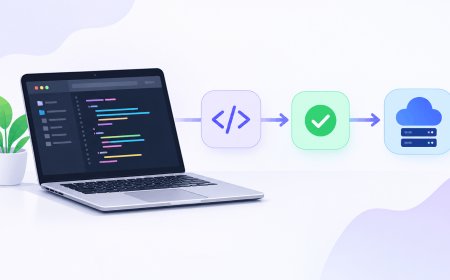
CI/CD gets thrown around in job listings and tech talks like everyone already knows what it means, but it's really just two linked ideas. Continuous Integration (CI) means every time a developer adds new code to a shared project, a computer automatically builds it and runs tests against it — instead of waiting for a human to remember to check. Continuous Deployment (or Delivery), the CD part, takes that a step further: once the code passes its checks, it gets automatically pushed toward production (deployment) or at least packaged and ready to go live with one click (delivery — the slightly more cautious version).
The whole point is to catch the Bengaluru startup's broken build in minutes, not days, and to make releasing new code a routine non-event instead of a nerve-wracking ritual. If you've read our piece on common Git mistakes beginners make, think of CI/CD as the automated safety net sitting right behind every one of those git push commands.
What a Pipeline Actually Looks Like
The automated sequence that runs all of this is called a "pipeline" — a chain of steps that each chunk of code has to pass through before it's considered safe to ship. A fairly typical one looks like this:
- Trigger: a developer pushes code to a shared repository (a hosted copy of the project, usually on GitHub or GitLab).
- Build: the pipeline compiles the code or installs its dependencies to confirm it even runs.
- Test: automated tests check that existing features still work and the new change does what it's supposed to.
- Scan: security and code-quality checks flag obvious vulnerabilities before they reach users.
- Deploy: if everything passes, the code moves to a staging server, and from there to production.
Each of these steps runs on a server somewhere — not your laptop — so a failing test shows up as a red cross in a dashboard within minutes, before it ever reaches a real user.
A pipeline that only runs when someone remembers to run it isn't a pipeline. It's a suggestion.
Why This Matters More in India's Tech Industry Than It Sounds
India's IT services giants and its startup ecosystem both run on the same underlying pressure: ship fast, but don't break things for a client in another time zone while your own team is asleep. For the services sector — the TCS, Infosys and Wipro world — CI/CD pipelines are now a standard clause in client contracts, because enterprise customers expect proof that releases are tested and auditable, not pushed by hand at midnight. For India's startup scene, the calculus is different but just as real: a small team can't afford a full-time release engineer, so CI/CD tools effectively do that job for free (or close to it). GitHub Actions, one of the most widely used pipeline tools, gives free accounts 2,000 build-minutes a month, which is enough for most early-stage Indian startups and solo developers to run a real pipeline without paying anything. It also matters for compliance: under India's Digital Personal Data Protection (DPDP) Act, companies handling user data need to show they're not pushing out unreviewed, untested code that could leak that data — an automated pipeline with mandatory security scans is a straightforward way to demonstrate that discipline.
The Tools People Actually Use
You don't need to build any of this from scratch. The common choices, roughly from "built into the platform you already use" to "set up your own":
- GitHub Actions — lives inside GitHub itself, configured with a simple text file in your repository. The default choice for most new projects today.
- GitLab CI/CD — the equivalent built into GitLab, popular with teams that prefer an all-in-one platform.
- Jenkins — older, open-source, and still common in larger enterprises because it's highly customizable, though it needs more setup and maintenance.
- CircleCI — a dedicated third-party service, often chosen for speed and a generous free tier for small teams.
None of these require deep DevOps expertise to get started. A basic pipeline for a small web app can be running within an afternoon, using a template the tool provides out of the box.
The Real Takeaway
CI/CD isn't a buzzword you need for a resume — it's the difference between finding out your code is broken from an automated test in five minutes, or finding out from an angry customer five hours later. If you're a solo developer or a small Indian startup team still testing things manually before every release, setting up even a bare-bones pipeline this week — one build step, one test step — will save you more debugging time than almost anything else you could do with an afternoon.
What's Your Reaction?
 Like
0
Like
0
 Dislike
0
Dislike
0
 Love
0
Love
0
 Funny
0
Funny
0
 Angry
0
Angry
0
 Sad
0
Sad
0
 Wow
0
Wow
0