










































What Is DNS and How Does It Actually Find Websites for You?
DNS quietly translates website names into IP addresses billions of times a day, and in India it also decides which sites you can reach.
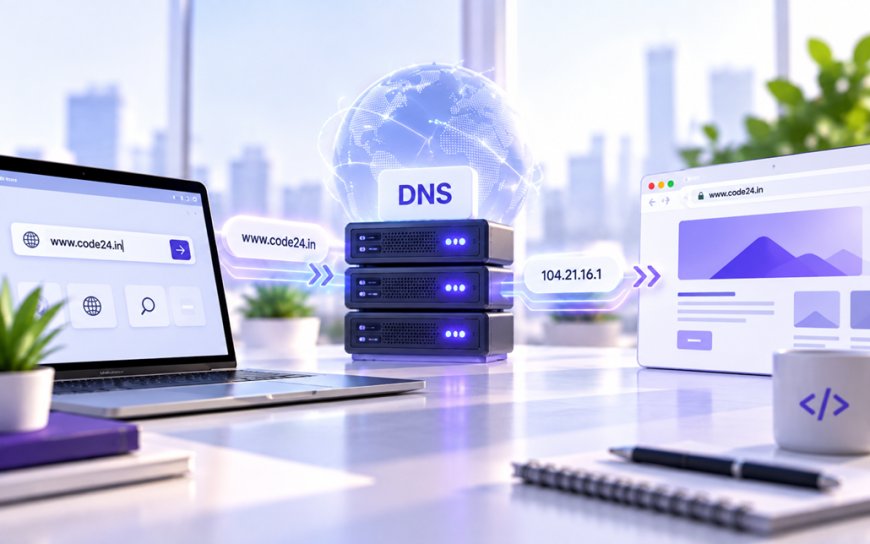
Type a website name into your phone and, well under a second later, the page loads. Nobody hands your phone a map. Somehow, out of billions of servers scattered across the planet, it finds the exact right one every single time. The thing doing that quiet work in the background is called DNS, and almost nobody thinks about it until it breaks.
DNS stands for Domain Name System, and its job is simple to describe even though the machinery behind it isn't: it translates the names humans type — like a website address — into the numeric addresses computers actually use to find each other on the internet, called IP addresses. Think of it as a phone book that the entire internet shares, except it updates itself constantly and answers billions of lookups a second without anyone noticing.
Why Computers Need a Translator at All
Every device connected to the internet, from the server hosting your favourite site to the phone in your pocket, has an IP address — a string of numbers that works like a postal address for data. Nobody wants to memorise a string of numbers to check the news or open a bank's website, so DNS exists purely to hide that complexity. You type a name, DNS quietly looks up the matching number, and your browser connects to that number without you ever seeing it.
This wasn't always automated. In the early 1980s, the internet's predecessor network kept the entire list of names and addresses in a single text file that every computer downloaded by hand. That obviously stopped scaling within a couple of years, which is exactly why DNS was invented — a distributed system where no single machine needs to know every answer, only where to ask next.
What Actually Happens in Those Few Milliseconds
When you hit enter on a web address, a small relay race happens before the page even starts loading:
- Your device first asks a resolver — usually run by your internet provider, or a public one you've configured — if it already knows the answer from a recent lookup.
- If not, the resolver asks a root server, one of a small number of heavily guarded machines that don't know the final answer but know which server handles the last part of the address (like ".com" or ".in").
- That server, in turn, points to the specific authoritative server responsible for the exact domain you typed.
- That authoritative server hands back the actual IP address, the resolver passes it to your device, and your browser finally opens a connection to the real website.
All of that, typically, in a few dozen milliseconds — and your resolver remembers the answer for a while afterward so it doesn't have to repeat the whole chain on your next visit to the same site.
DNS is the closest thing the internet has to plumbing: invisible when it works, and the first thing you suspect when everything else looks fine but nothing loads.
Where This Gets Relevant in India Specifically
DNS isn't just plumbing here — it's also a policy lever. When Indian courts or the Department of Telecommunications order internet providers to block a piracy site or an app the government has flagged, the most common method is DNS-level blocking: the provider's resolver simply refuses to answer for that domain, so the address doesn't resolve even though the site itself is untouched elsewhere in the world. That's also why switching to a different resolver, such as one from Google or Cloudflare, sometimes makes a "blocked" site load again — you're just asking a different phone book that hasn't been told to withhold the entry.
India also runs its own piece of this system directly. NIXI, the National Internet Exchange of India, manages the registry behind every ".in" domain and has worked to bring DNS infrastructure — including root server capacity — onto Indian soil, which shaves real time off lookups for the country's fast-growing base of broadband and mobile data users rather than routing every query overseas and back.
The Security Side Nobody Warns You About
Because DNS is a request-and-response system with no built-in way to verify who's answering, it's also a target. In an attack called DNS spoofing (or cache poisoning), a bad actor tricks a resolver into storing a false answer, quietly redirecting people who type a legitimate bank or shopping site toward a fake one built to steal login details. It's a real reason to care which resolver you actually use, and it pairs naturally with other privacy habits — if you already use a VPN, which reroutes your traffic through an encrypted tunnel, it's worth knowing what a VPN does and doesn't protect against, since a poor DNS setup can undercut even a good VPN.
A few resolvers worth knowing by name, since most people never change the default their ISP hands them:
- 1.1.1.1 — Cloudflare's public resolver, built with speed and privacy commitments as the main selling point.
- 8.8.8.8 — Google's public resolver, widely used and reliable, though it does mean Google sees your lookup requests.
- Your ISP's default — often fine for everyday use, but not always the fastest, and subject to whatever blocking orders apply in that region.
The Practical Takeaway
You don't need to understand DNS to use the internet, which is exactly the point — it was built to disappear. But the next time a site refuses to load while everything else works fine, or a "blocked" page won't open on your home network but does on mobile data, you'll know it's very likely this quiet translation system doing exactly what it was told, one way or another. That's usually a five-minute fix, not a broken internet.
What's Your Reaction?
 Like
0
Like
0
 Dislike
0
Dislike
0
 Love
0
Love
0
 Funny
0
Funny
0
 Angry
0
Angry
0
 Sad
0
Sad
0
 Wow
0
Wow
0