









































What Is CI/CD? How Automated Software Delivery Actually Works
CI/CD explained in plain English: what continuous integration and deployment mean, how pipelines work, and why Indian teams use them.
Somewhere between you typing git push and the app updating on someone's phone, a small army of automated scripts quietly ran your tests, packaged your code, and decided whether it was safe enough to go live. Most developers barely notice this happening anymore. That invisible machinery is called CI/CD, and it's one of those terms that gets thrown around in job listings constantly while rarely getting explained properly.
CI and CD Are Actually Two Different Things
CI/CD is really two ideas glued together with a slash. Continuous Integration (CI) means developers merge their code into a shared repository (the central storage place for a project's code, usually on GitHub or GitLab) frequently, often several times a day, instead of hoarding changes for weeks. Every time someone pushes new code, a CI system automatically builds it (compiles or assembles it into a runnable form) and runs the test suite against it. If something breaks, the team finds out in minutes, not after three other people have built on top of the broken code.
Continuous Delivery/Deployment (CD) picks up where CI leaves off. Once code passes its tests, CD automatically packages it and moves it toward production — the live environment real users touch. "Delivery" usually means the tested build is ready to ship and a human clicks a button to release it; "deployment" means there's no button at all, and passing code goes live on its own. Companies pick whichever suits how much risk they're comfortable automating away.
What a Pipeline Actually Does, Step by Step
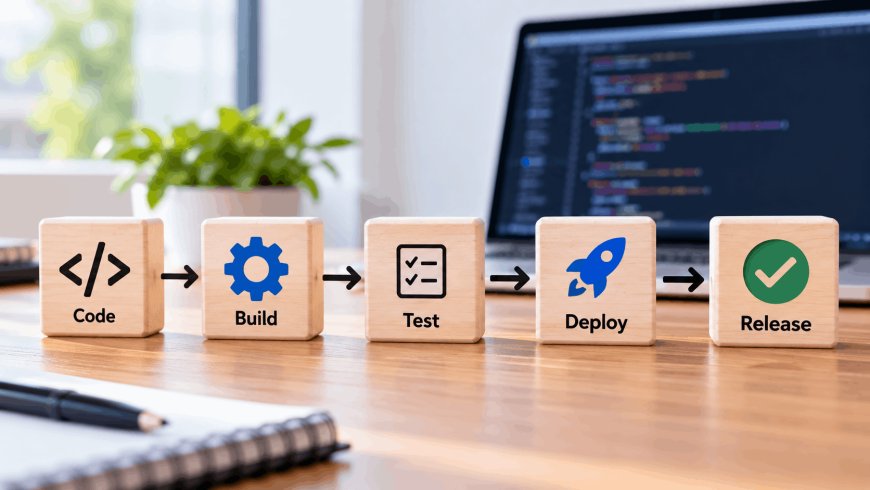
The word "pipeline" just means the ordered sequence of automated steps a code change passes through. A fairly typical one looks like this:
- Commit — a developer pushes a code change to the shared repository.
- Build — the pipeline compiles the code and checks it isn't broken in an obvious way.
- Automated tests — unit tests, integration tests, sometimes security scans, all run without a human watching.
- Staging deploy — the build goes to a staging environment, a near-identical copy of production used purely for final checks.
- Production deploy — once everything passes, the change ships to real users, either automatically or after a manual approval.
Tools like Jenkins, GitHub Actions, GitLab CI, and CircleCI are the engines that actually run these steps. They're mostly interchangeable in concept — config files that say "when code is pushed, do these things in this order."
The real product of a good CI/CD pipeline isn't speed. It's boring deployments — the kind nobody has to stay late for.
That's a genuinely underrated way to think about it. Teams that get CI/CD right tend to ship small changes constantly and barely talk about it. Teams that skip it tend to have one terrifying "release day" a month where everything gets bundled together and something inevitably catches fire.
Why This Matters for Indian Dev Teams Specifically
This isn't just a Silicon Valley concern. A lot of India's product companies — Razorpay, Zerodha, and similar fintech and SaaS firms — run CI/CD as a baseline practice, and it's become one of the most common technical interview topics for backend and DevOps roles at Indian startups, right alongside Docker and Kubernetes, which pipelines frequently deploy into.
There's a cost angle too. GitHub Actions gives free build minutes on public repositories and a limited quota on private ones, which matters for students, freelancers, and bootstrapped founders in India who are watching every rupee of infrastructure spend. And for larger Indian IT services firms like TCS, Infosys, and Wipro, moving decades-old client codebases from manual, ticket-based release processes to automated pipelines has been a major part of their "modernization" pitch to enterprise clients over the last few years.
There's also a quieter compliance benefit. Under India's Digital Personal Data Protection (DPDP) Act, companies handling user data are expected to maintain accountability over how systems change over time. A CI/CD pipeline, almost as a side effect, leaves behind an automatic audit trail — who pushed what, when it was tested, and when it went live — which is a lot cleaner than trying to reconstruct that history from memory after the fact.
Common Mistakes Teams Make When Setting This Up
CI/CD isn't magic, and a poorly built pipeline can do real damage. A few recurring mistakes:
- Automating a pipeline with no real tests behind it — this just means broken code ships faster and with more confidence than it deserves.
- Hardcoding secrets (API keys, database passwords) directly into pipeline configuration files instead of using a secrets manager, where they can end up exposed in a public repository.
- Skipping staging entirely and testing changes directly against production users.
- Building one enormous, tangled pipeline that only one engineer on the team actually understands, which becomes a single point of failure the day that person is on leave.
None of these are arguments against CI/CD — they're arguments against building it carelessly, which is a different problem entirely.
Where to Actually Start
If a team has none of this in place, the instinct is often to aim for full automatic production deployment on day one. Don't. Start with just the CI half: get every push to automatically run tests and report pass or fail. That alone catches a surprising share of regressions before they reach anyone, costs almost nothing to set up with a free GitHub Actions workflow, and builds the trust a team needs before it's comfortable letting a robot push code to production unattended.
What's Your Reaction?
 Like
0
Like
0
 Dislike
0
Dislike
0
 Love
0
Love
0
 Funny
0
Funny
0
 Angry
0
Angry
0
 Sad
0
Sad
0
 Wow
0
Wow
0