
































What Is OAuth? How "Sign in with Google" Actually Works
How apps verify you without seeing your password — and why OAuth consent screens matter under India's DPDP Act.
Every time you tap "Continue with Google" instead of typing out yet another email and password, something more interesting than a shortcut is happening behind the scenes. You're using OAuth, a protocol that lets one app trust another without ever handing over your actual password — and understanding it changes how you think about every "Allow" button you've ever clicked without reading.
The Problem OAuth Was Built to Solve
Before OAuth became the default, if a travel app wanted to check your Gmail for flight confirmations, there was really only one option: give the app your Gmail password. That's a terrible idea for obvious reasons — the app could read every email you've ever sent, reset your other accounts using "forgot password" links, and keep working even after you'd stopped wanting it to.
OAuth (short for Open Authorization) fixes this by separating two things that used to be bundled together: proving who you are, and giving permission for a specific, limited action. Instead of a password, apps get a token — a temporary, scoped digital pass that says "this app can see your email address and profile photo, nothing else, for the next hour." Revoke it, and the access disappears without touching your actual account credentials.
How the "Sign in with Google" Handshake Actually Works
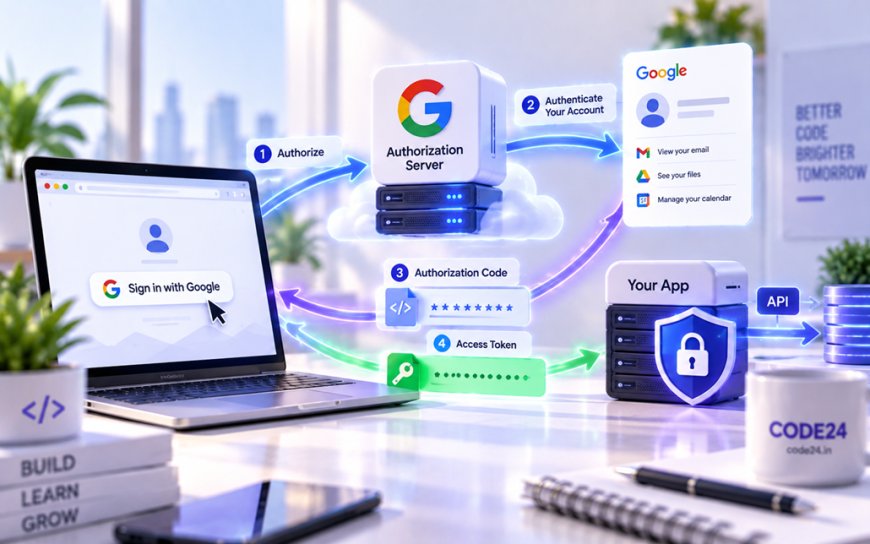
The flow looks instant to you, but a fair bit happens in those two seconds after you click the button:
- The app redirects you to Google's own login page — not a fake copy inside the app, the real one, so your password only ever touches Google's servers.
- You log in (or you're already logged in) and see a consent screen listing exactly what the app is asking for: your name, email, maybe your contacts.
- If you approve, Google sends back a short-lived authorization code to the app.
- The app exchanges that code, behind the scenes, for an access token — the actual key it uses to fetch your basic profile data from Google's servers.
Notice what never happens in that sequence: at no point does the app ever see or store your Google password. That's the entire point.
OAuth was never designed to prove who you are — it was designed to let you say yes to an app without handing over the keys to say it.
Why This Matters More in India Right Now
India has quietly become one of the biggest test beds for consent-based data sharing in the world, and OAuth-style thinking sits underneath a lot of it. Account Aggregators — the RBI-regulated framework that lets you share your bank statements with a lender through explicit, revocable consent instead of emailing PDFs — work on the same principle: a scoped, time-bound token instead of a password. UPI AutoPay mandates and Aadhaar-based e-KYC checks (the electronic identity verification banks and apps use to confirm who you are) borrow the same logic too: approve a specific, narrow permission rather than hand over full access.
It also matters because of India's Digital Personal Data Protection (DPDP) Act, which puts real legal weight behind the idea of informed, specific consent for how your data gets used. An OAuth consent screen that vaguely says "this app wants access to your Google Account" without listing what that actually includes is exactly the kind of unclear consent the DPDP Act is meant to push companies away from. For Indian developers building anything that touches user logins — and a huge share of India's startup ecosystem does, from fintech apps to food delivery to ed-tech — getting OAuth scopes right isn't just good practice anymore, it's increasingly a compliance question too.
Where People (and Apps) Get It Wrong
OAuth is solid engineering, but the human layer around it is where things break down. A few recurring mistakes worth knowing about:
- Over-broad scopes: plenty of apps ask for full inbox access when they only need your email address, because it's easier to build that way.
- Consent-screen phishing: attackers build malicious "apps" that request OAuth permissions and trick people into approving them, since it looks like a normal login rather than a password prompt — no password is stolen, but the token works just as well for the attacker.
- Forgotten grants: most people have granted OAuth access to dozens of apps over the years and never revisit the list, leaving old tokens active for services they stopped using long ago.
- Token leakage: a poorly secured app that stores your access token in an insecure way can expose it just like a leaked password would.
The Practical Takeaway
You don't need to understand token exchange mechanics to use OAuth safely — you just need to treat the consent screen the way you'd treat a contract, not a popup to dismiss. Actually read what permissions an app is asking for before approving, and every few months, open your Google, Facebook, or Microsoft account settings and look at the full list of connected apps. You'll likely find services you stopped using years ago that still technically have a live token sitting there. Revoking access you don't need takes thirty seconds and closes a door you probably forgot was open.
What's Your Reaction?
 Like
0
Like
0
 Dislike
0
Dislike
0
 Love
0
Love
0
 Funny
0
Funny
0
 Angry
0
Angry
0
 Sad
0
Sad
0
 Wow
0
Wow
0